

Introducing Epicweb SEO Manager for Optimizely CMS
Which pages are missing an SEO title or meta description? Epicweb SEO Manager helps you find them, review AI suggestions alongside each page, and save/publish your edits as drafts directly in Optimizely CMS.

You’re getting a group of pages ready for a campaign. The content is in place, but some pages are still missing a meta description. Others have titles that could be shorter or clearer. On a site with several languages, it can take a while just to find the pages that need attention.
Epicweb SEO Manager is part of Epicweb AI Assistant for Optimizely CMS. It gives web editors one place to find metadata issues, review the affected pages, and make changes. Marketing teams can start with the section and language that matter for a campaign, and editors can work through the results page by page.
Epicweb AI Assistant already offers shortcuts for individual SEO fields and an AI Chat that can review content or compare language versions. SEO Manager adds a dedicated workflow for reviewing metadata across a group of pages. See how we’ve been working with SEO in Epicweb AI Assistant.
Find the pages that need attention
Open SEO Manager from the AI Assistant menu. Choose a site and language, then narrow the scan to a branch of the page tree or a specific page type if needed. Click Find pages to check the configured SEO fields.
In the Alloy example below, the scan checked 29 English pages and found SEO issues on 15. The About us page has a meta description of 179 characters, and Become a reseller has an SEO title of 104 characters. Select Show only pages with issues to focus the list on pages with flagged fields.
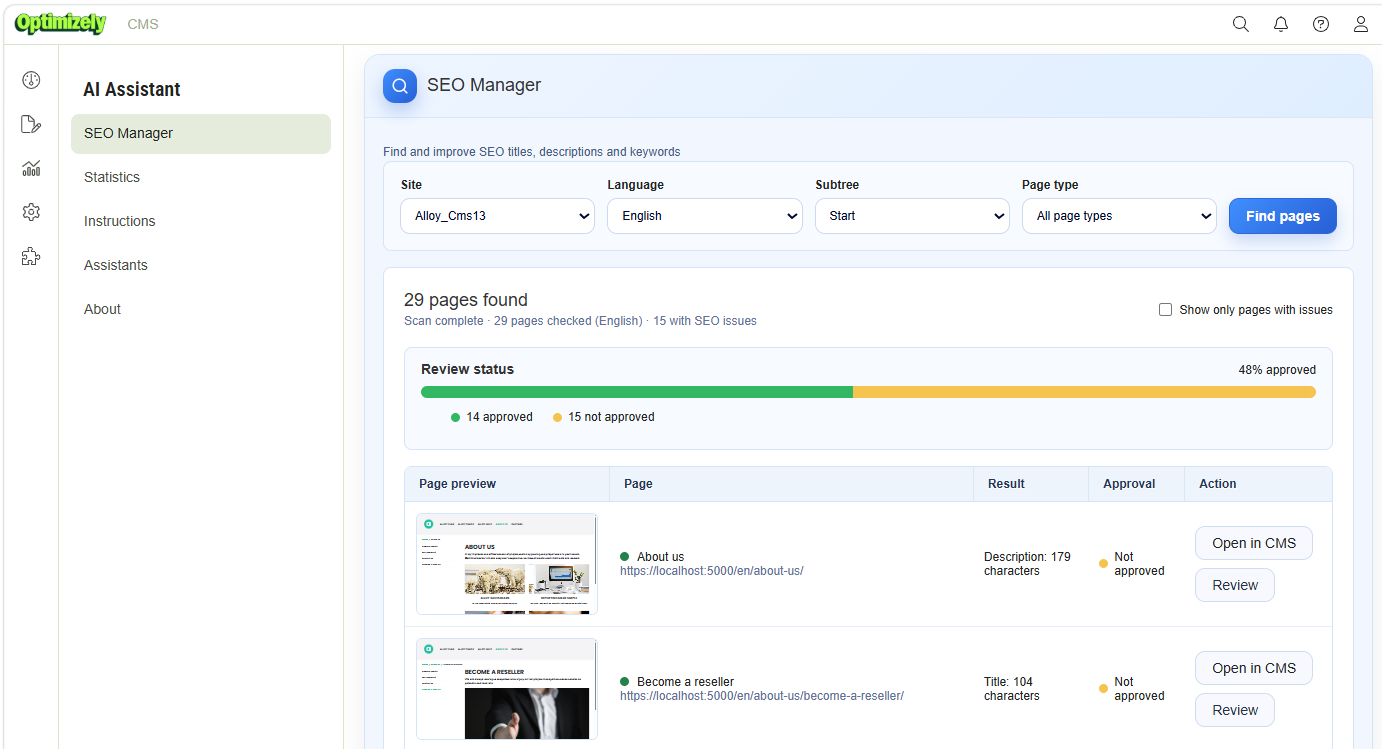
The scan results show what was checked, which fields need attention, and the review status of the pages in the list.
Review metadata with the page in front of you
Click Review to open a page. The preview is on the left, with the current metadata and editable draft fields on the right. You can read the page, check what its title and description say, and use Previous or Next to move through the list.
That side-by-side view makes a small but important difference. When you change a description, you can check whether it captures what a reader will actually find on the page.
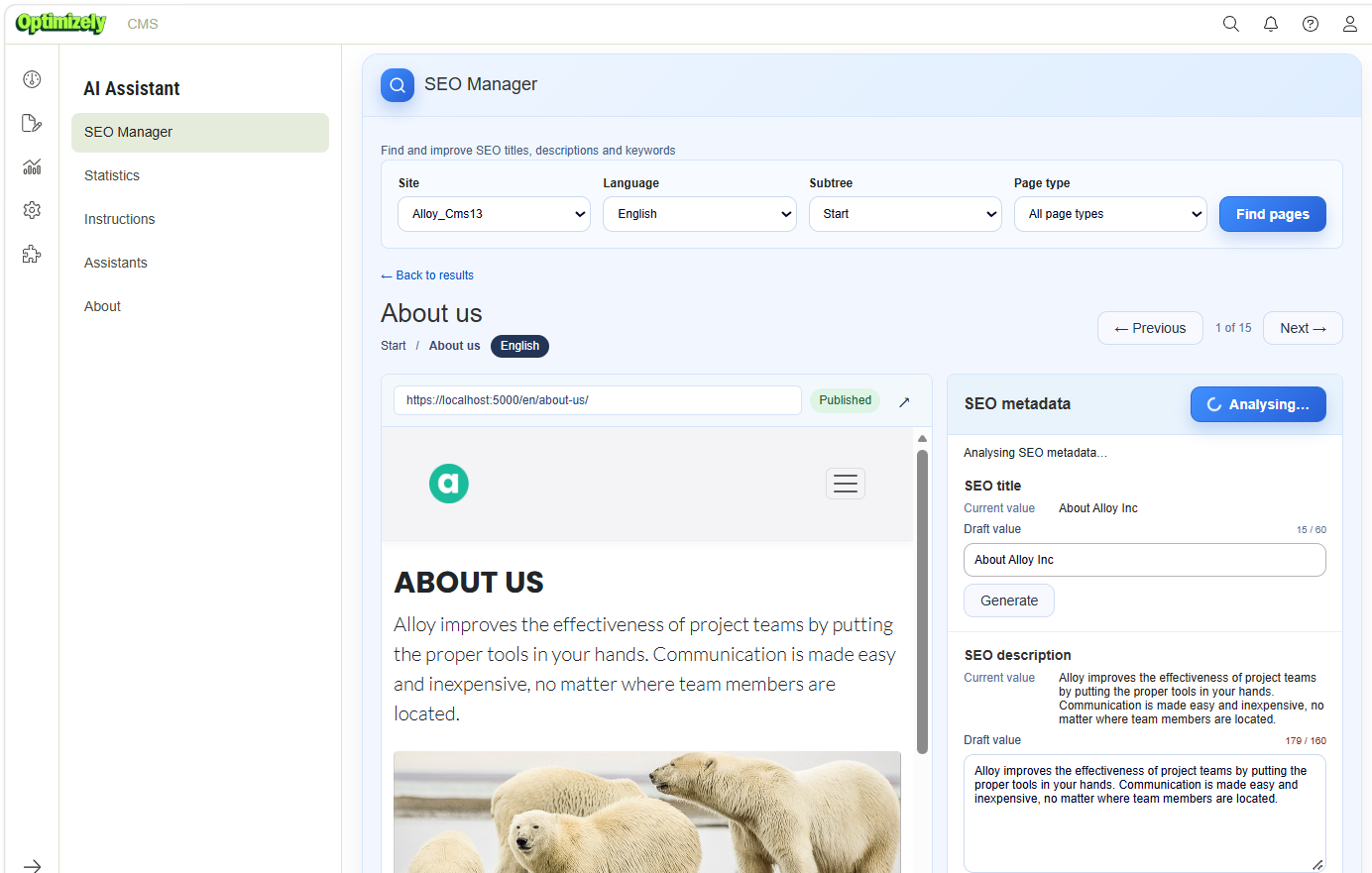
The English About us page is open in the review view, with the page preview on the left and the SEO fields on the right.
Use AI where it helps
Select Analyse and suggest to review the configured fields using the page content and existing metadata. You can also use Generate or Regenerate to work on one field at a time. The AI explains its recommendation, which helps you decide whether the change makes sense.
On the Alloy About us page, the AI says the existing title, About Alloy Inc, is clear and fits the page. It suggests shortening the 179-character description while keeping the main point about how Alloy helps project teams communicate.
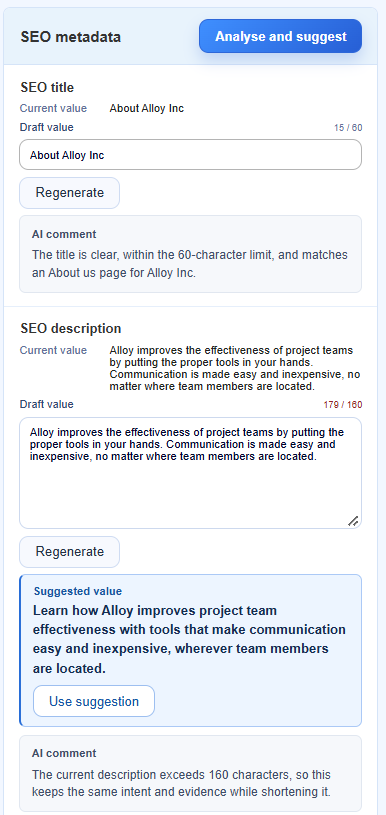
The AI recommends keeping the existing title and explains why it proposes a shorter description. Use suggestion copies the proposed text into the draft field.
You can edit the suggestion before clicking Save draft. If you’ve checked a page and are happy with its metadata, you can mark it as reviewed and move on.
Set up SEO Manager for your site
Developers can enable SEO Manager in the Epicweb AI Assistant settings and map the site’s existing SEO properties with [SeoField]. Teams can also customize the AI instructions by language so that suggestions use the right product names and wording for each market. The setup guide covers field mapping, access, and configuration. Read the Epicweb SEO Manager documentation on GitHub.
FAQ
What does SEO Manager check?
It flags missing values in mapped SEO title and meta description fields. It also flags titles longer than 60 characters and descriptions longer than 160 characters. These are the thresholds SEO Manager uses to surface pages for review.
Does the scan check draft or published content?
It checks the common draft for the selected language when one exists and uses the published version as a fallback.
Can I use SEO Manager on a multilingual site?
Yes. Choose the language you want to scan, then review those pages in that language. AI suggestions are written in the language of the page you’re reviewing.
Do I need AI Chat to use SEO Manager?
You can use SEO Manager with AI Chat turned off. The scan checks the mapped fields locally. Generating suggestions requires a configured AI provider.
Who decides what gets published?
The editor chooses which suggestions to use and when to save a draft. Users with publish permission can publish a saved draft from SEO Manager once that language version has been published at least once in Optimizely CMS.
Book a meeting to get started!
We offer a one-hour introduction meeting about our AI Assistant for Optimizely CMS 12 or later. (Swedish or English)
The AI Assistant: This is what you get
Feature-Rich for Enhanced Editorial Efficiency
Epicweb's AI Assistant comes with an impressive array of features:
-
Text Suggestions and Alternatives: Enhance your writing with AI-generated phrasing and alternative variations.
-
Multilingual Translation: Seamlessly translate your text into multiple languages while preserving formatting and style to reach a diverse audience.
-
SEO, AEO and GEO: Generate optimization content for search engines and AI search.
-
SEO Manager — Scan a site or section for missing or overly long SEO titles and meta descriptions. Review AI suggestions alongside the page and save your edits as drafts.
-
Prompt Pro Assistance: It saves time and helps you get more out of your ideas, instantly.
-
Image AltText Analyzer: Advanced AI capabilities to analyze images and automatically populate media object properties
-
Image Generation: Create relevant and engaging images that complement your content.
-
Image Transformer: Take any image, enhance it, and add new elements with AI-powered creativity. Transform the way you interact with images.
-
New Text Generation: Generate fresh content that keeps your audience engaged.
-
Text Summarization: Quickly condense long texts into concise summaries, saving time and maintaining essence, perfect for SEO descriptions.
-
HTML Formatting: The AI-Assistant offers a range of formatting capabilities within the Rich Text Editor. WCAG Compatible.
-
Spell-Checking: Ensure your content is error-free and professionally polished.
-
Tone Adjustment and Consistency: Adapt your content’s tone to suit its purpose and maintain a consistent brand voice.
-
Keyword Extraction: Identify and extract key terms from your text for SEO optimization.
-
Custom Assistants: Harness the power to run your own prompts for tailored, unique content management.
-
Custom Shortcut Prompts: Add your own shortcuts for frequently used commands, connect tools and enhancing productivity.
-
Inline Chat: Use ChatGPT or Google GEMINI directly within the platform for instant assistance with full context awarness.
-
Tools for AI: Connect your C# Function Calling or MCP tools directly to the AI Assistant, enabling custom integrations.
-
RAG (Retrieval-Augmented Generation): Connect your own knowledge base for AI responses powered by your organization’s internal data.
Streamlined Integration into Optimizely
The AI Assistant is seamlessly integrated into every field within the Optimizely CMS and Commerce platform, ensuring that these powerful features are accessible right where you need them, in the editor mode.
Getting Started with The Epicweb AI-Assistant:
To get started with the free evaluation, simply fill in the form in our website to get started and download the addon to your Optimizely CMS and Customizable Commerce platform from the Optimizely Nuget feed.
Follow our beginner-friendly guide or dive deep with our comprehensive documentation.
Installation is quick and easy, allowing you to start harnessing the power of AI assistance in no time.
Book a meeting to get started!
We offer a one-hour introduction meeting about our AI Assistant for Optimizely CMS. (Swedish or English)
Note: This blog post has been enhanced with the help of the AI-Assistant for Optimizely.
Calculate Your Savings
See how much time and cost your editorial team could save with AI directly inside Optimizely CMS.
Use our calculator to estimate the potential savings based on your content volume, languages and editorial workflow.
AI that understands your content, your CMS and your workflow
About the Author